
ADDING PHOTOS TO MY ALBUM

KevinDU

Member
Joined
Dec 10, 2010
Messages
96
Reaction score
1
C Dory Year
2007
C Dory Model
22 Cruiser
Vessel Name
Sea Otter
I cannot for the life of me figure out how to add a photo to my existing album. Whoever made this new site really sucks at being a webmaster. I might even delete my existing album. Good night
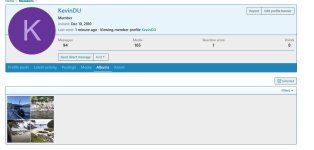
 
Click on your name at the top of the page. When the next page opens, click on your name in the box. In the next box that opens, click on "albums." I bookmark this page as a favorite to make it easier to get to next time. In the small boxes to the right are folder icons in the upper right of each folder. Click on the folder icon you want to add media to. On the next page, select "upload file." Select as many photos as you want to upload from your computer. After they upload, click on "save."
 
I followed Phil instructions and was able to add a photo to an album, but I can’t find where to add a new album. Anyone can help please?

Thanks to all involve to creating and maintaining this new site, and kept the old one going for as long as it did. I know the improvements are not done, and that’s good with me since I’m a very slow learner.
 
Click on your name at the top of the page. When the next page opens, click on your name in the box. In the next box that opens, click on "albums." I bookmark this page as a favorite to make it easier to get to next time. In the small boxes to the right are folder icons in the upper right of each folder. Click on the folder icon you want to add media to. On the next page, select "upload file." Select as many photos as you want to upload from your computer. After they upload, click on "save."
Sorry, I am still stuck. What do I do when I get to this page in attached screenshot? Where are the folders you are talking about and how do I get to "upload files" from here?
 

Attachments

  • Screenshot_9-1-2026_104020_www.c-brats.com.jpeg
    Screenshot_9-1-2026_104020_www.c-brats.com.jpeg
    62.2 KB · Views: 5
I clicked on my album pictures and the "upload files" link showed up! Takes a genius to figure this out. Why not just add a link (button) to take you to this page? Geees...
 
Back
Top